10 Essential Steps to Build a Conversational Spotify Ads Manager with Claude Code Plugins
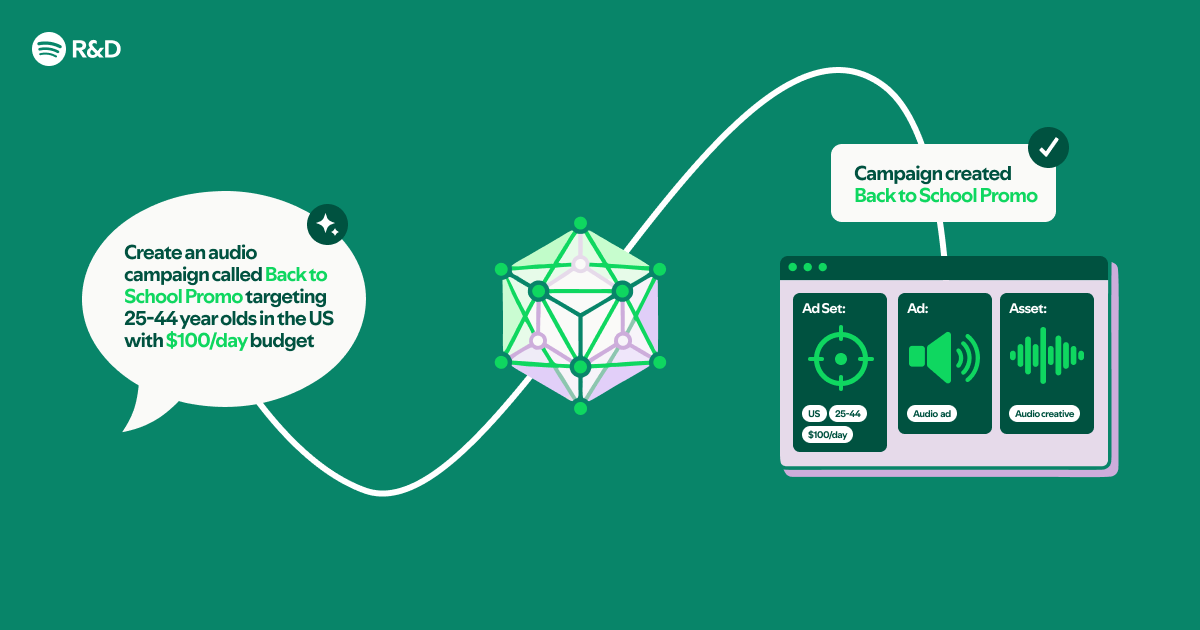
Imagine managing your Spotify ad campaigns through a simple chat conversation—no coding, no complex dashboards, just plain English. That’s exactly what we achieved by combining OpenAPI specifications, Markdown documentation, and Claude Code Plugins. In this article, we break down the process into 10 actionable steps, showing you how to transform raw API specs and docs into a natural language interface that feels like talking to a knowledgeable assistant. Whether you’re a developer exploring generative AI or a marketer seeking efficiency, these steps will guide you through building a tool that turns API complexity into conversational ease.
1. Understand the Core Components
Before diving in, grasp the three pillars of this project: the Spotify Ads API (which exposes campaign management endpoints), OpenAPI specification (a machine-readable description of the API), and Claude Code Plugins (a framework that lets Claude interact with external tools). The magic happens when you feed the OpenAPI spec and Markdown documentation into Claude, enabling it to understand the API’s structure, parameters, and use cases. This step is critical because it sets the foundation—without a clear understanding of each component, you’ll struggle to design a seamless conversational flow.
2. Prepare the OpenAPI Specification
Start with a clean, well-structured OpenAPI (formerly Swagger) file for the Spotify Ads API. This file describes every endpoint, request format, response schema, and authentication method. If the official spec is too large, trim it to only include endpoints relevant to your use case—like creating campaigns, fetching analytics, or managing audiences. Use tools like Swagger Editor to validate and simplify. The goal is to create a compact yet comprehensive spec that Claude can parse efficiently. Remember: the more precise your spec, the fewer hallucinations or misinterpretations during conversation.
3. Curate Markdown Documentation
Complement the OpenAPI spec with human-readable Markdown files. These should explain business logic, best practices, and context that raw specs miss. For example, include explanations of ad types, bidding strategies, and campaign objectives. Also add troubleshooting tips and example conversations. Keep each file focused (e.g., one for campaign creation, another for reporting). Use clear headings, bullet points, and code snippets. This documentation becomes Claude’s knowledge base, allowing it to answer questions like “What’s the difference between podcast and music ads?” or “How do I set a budget cap?”
4. Set Up Claude Code Plugins
Claude Code Plugins act as the bridge between natural language and API calls. Install the plugin SDK (available via the Anthropic API) and configure it to load your OpenAPI spec and Markdown files. The plugin system lets Claude dynamically resolve API calls by reading the spec, constructing requests, and interpreting responses. You can also define custom actions—like “createAdCampaign”—that map to API endpoints. Test the plugin in isolation by sending sample queries and verifying it correctly parses parameters (e.g., extracting “campaign name” from user input).
5. Design the Conversation Flow
Map out typical user journeys. For instance, a user might say: “Launch a new ad campaign for my podcast targeting US listeners aged 25-34.” Break this into a series of intents: identify campaign objective, specify targeting, set budget, and confirm. Use the Markdown docs to train Claude on expected parameters and validation rules. Also plan for fallback prompts when information is missing—Claude should ask clarifying questions like “What’s your daily budget?” This step ensures the conversation feels natural and guided, not robotic.
6. Implement Authentication Handling
Spotify Ads API requires OAuth 2.0 authentication. Your Claude plugin must securely store and refresh tokens. One approach: have Claude prompt the user for authorization once, then store the token in an environment variable or secure vault. Within the plugin code, inject the token into each API request header. Test with a simple “list campaigns” call to confirm authentication works before adding complex flows. Also handle token expiration gracefully by triggering a re-authentication request when a 401 response is received.

7. Test with Realistic Scenarios
Run end-to-end tests that mimic real advertiser tasks: creating a campaign, pausing it, checking performance metrics. Use a test ad account to avoid accidental charges. Verify that Claude correctly interprets ambiguous inputs—for example, “last week” should translate to specific dates. Log all API calls and Claude’s reasoning to debug errors. Pay attention to edge cases like missing permissions, invalid targeting parameters, or network timeouts. Iterate on your OpenAPI spec and docs based on these tests to improve accuracy.
8. Optimize Performance and Cost
Claude API calls and plugin operations have latency and token costs. Minimize unnecessary calls by caching common responses (e.g., list of available ad formats). Use streaming responses from Claude to show partial results while waiting for API data. Also limit the context window by only feeding relevant parts of the OpenAPI spec and Markdown per query. For instance, if the user asks about reporting, load only the reporting endpoints and related docs. This keeps responses fast and reduces token usage.
9. Add Safety and Validation Layers
Prevent Claude from executing destructive actions (like deleting campaigns) without explicit confirmation. Implement a two-step approval for write operations: first, Claude summarizes the action and asks “Are you sure?”; if confirmed, the plugin proceeds. Also validate user inputs (e.g., budget must be a positive number) before passing to the API. Use the Markdown docs to define allowed values and ranges. This safety net builds trust and protects advertiser accounts from accidental misuse.
10. Deploy and Iterate
Package your Claude plugin as a lightweight serverless function (e.g., AWS Lambda) or a container. Expose it via a webhook that Claude can call. Set up monitoring for API errors and unexpected Claude behavior. Collect user feedback to refine the Markdown docs—perhaps users want to ask “What’s my top-performing ad?” and need a query explanation. Continuously update the OpenAPI spec as Spotify releases new endpoints. Over time, your natural language interface will become more intuitive and powerful.
Conclusion Building a natural language interface to the Spotify Ads API with Claude Code Plugins is not just a technical experiment—it’s a glimpse into the future of ad management. By following these 10 steps, you’ve transformed static documentation into an interactive, conversational tool that lowers the barrier for advertisers. No compiled code means rapid iteration, and the power of Claude ensures complex API details are handled seamlessly. As generative AI evolves, such interfaces will become the norm, democratizing access to powerful marketing platforms. Start small, test often, and watch your conversational ads manager take flight.
Originally published on Spotify Engineering.
Related Articles
- The Key to Effortless Unit Testing: Prime Testable Code
- cargo-nextest Hits 3x Speed Boost Over cargo test as RustRover Gets Native IDE Support
- How to Optimize Go Performance with Stack Allocation for Slices
- 7 Key Insights into Structured-Prompt-Driven Development (SPDD)
- Go 1.26 Overhauls `go fix` Tool: Automated Code Modernization Now Available
- New VS Code Python Extension: Smarter Symbol Search and Faster Indexing
- Go 1.26 Type Checker Overhaul Targets Hidden Cycle Bugs
- How to Revolutionize AI Agent Performance with NVIDIA's Unified Omni-Modal Model