Mastering KV Cache Compression: A Practical Guide to TurboQuant
Overview
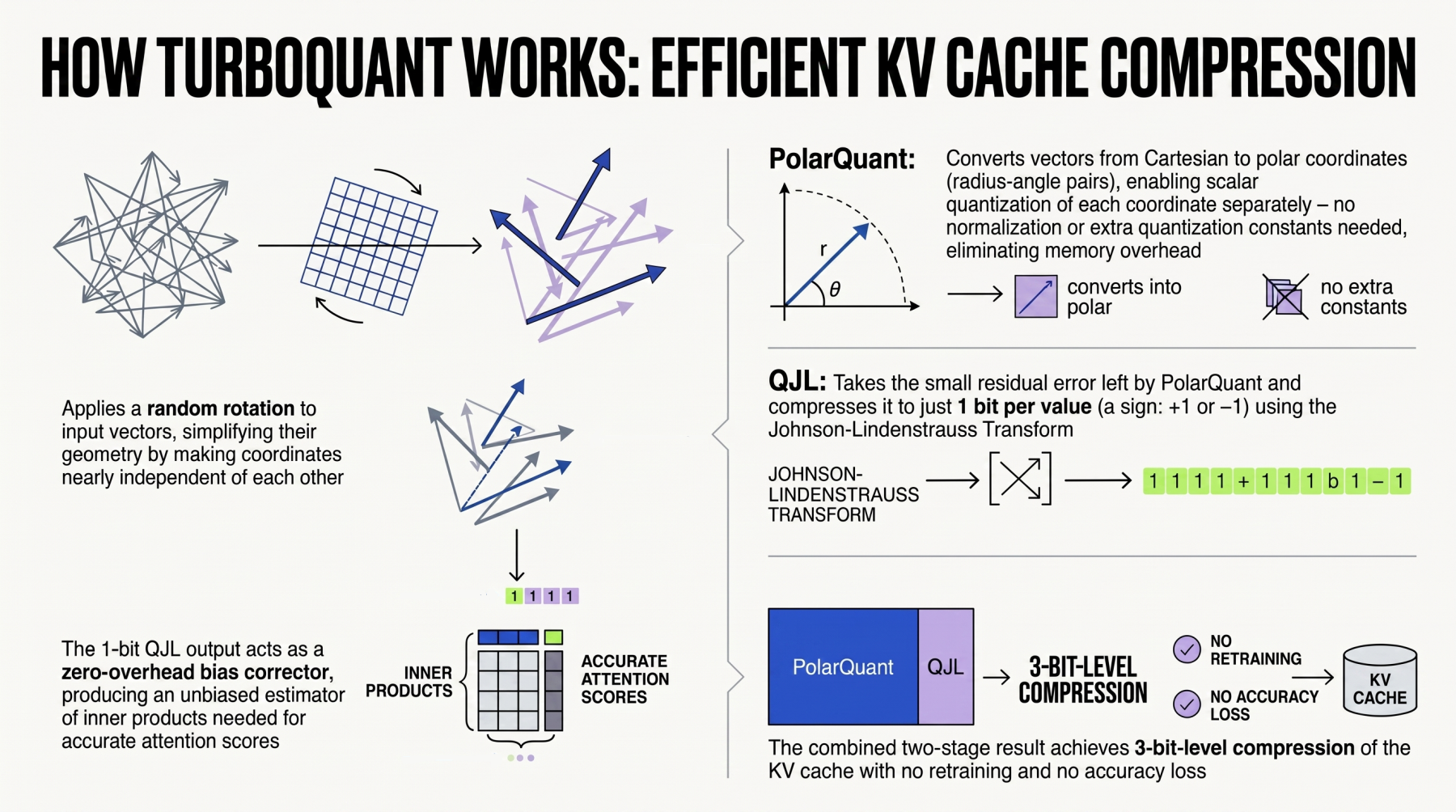
Large language models (LLMs) and retrieval-augmented generation (RAG) systems rely heavily on the key-value (KV) cache to maintain context across long sequences. However, the KV cache grows linearly with sequence length and batch size, quickly exhausting GPU memory and limiting inference throughput. Google's recently launched TurboQuant is a novel algorithmic suite and library designed to apply advanced quantization and compression specifically to the KV cache, as well as to vector search engines that underpin RAG pipelines. This tutorial provides a comprehensive, step-by-step guide to integrating TurboQuant into your LLM inference workflow, reducing memory footprint without sacrificing accuracy.
Prerequisites
Before diving into TurboQuant, ensure your environment meets the following requirements:
- Python 3.8+ and a working
pipinstallation. - PyTorch 1.13+ (CUDA 11.7 or newer) with GPU support.
- Basic familiarity with Transformer-based LLMs and their KV cache structure.
- Access to a target LLM (e.g., LLaMA, Mistral) and a calibration dataset (e.g., WikiText-2).
- Optional but recommended:
faiss-gpufor vector search integration.
Step-by-Step Guide to TurboQuant
1. Installation
Install TurboQuant via pip:
pip install turboquantIf you plan to use the vector search compression module, also install FAISS:
pip install faiss-gpu2. Loading a Model and Understanding the KV Cache
Start by loading a pre-trained LLM. For this example, we'll use a LLaMA-2 7B model. TurboQuant works with any Hugging Face Transformer model.
from transformers import AutoModelForCausalLM, AutoTokenizer

model_name = "meta-llama/Llama-2-7b-hf"
tokenizer = AutoTokenizer.from_pretrained(model_name)
model = AutoModelForCausalLM.from_pretrained(
    model_name,
    device_map="auto",
    torch_dtype=torch.float16
).eval()
The KV cache is typically stored as pairs of tensors for each attention layer. You can inspect it after a forward pass:
# Generate a small sequence to populate the cache
inputs = tokenizer("Hello, how are you?", return_tensors="pt").to("cuda")
with torch.no_grad():
    outputs = model(**inputs, use_cache=True)
    past_key_values = outputs.past_key_values
print(f"Number of layers: {len(past_key_values)}")
print(f"Shape of keys in first layer: {past_key_values[0][0].shape}")
3. Calibrating the Quantization Parameters
TurboQuant uses post-training quantization (PTQ) that requires a small calibration dataset to determine optimal scale factors and compression thresholds. Collect a few hundred samples, preferably from the same domain as your inference data.
from turboquant import TurboQuantConfig, calibrate
from datasets import load_dataset

# Load calibration dataset (e.g., WikiText-2)
dataset = load_dataset("wikitext", "wikitext-2-raw-v1", split="train")
calibration_texts = dataset["text"][:200]  # Use 200 samples
Configure TurboQuant for KV cache compression. You can adjust the bit-width (default 4-bit) and compression ratio for either uniform or mixed-precision allocation.
config = TurboQuantConfig(
    kv_cache_bits=4,
    compression_ratio=0.5,  # Target compression factor
    calibration_batch_size=16,
    device="cuda"
)
Run the calibration process:
calibrate(
    model,
    tokenizer,
    calibration_texts,
    config,
    output_dir="./turboquant_calib"
)
This step produces a calibration file that TurboQuant will use at inference time.
4. Applying KV Cache Compression at Inference
Now enable TurboQuant for inference. Wrap your model with the compression handler:
from turboquant import TurboQuantInference

turbo_model = TurboQuantInference(model, config_path="./turboquant_calib/config.json")
Generate text normally—the KV cache is now compressed on the fly:
input_text = "Explain quantum computing in simple terms."
inputs = tokenizer(input_text, return_tensors="pt").to("cuda")
with torch.no_grad():
    output_ids = turbo_model.generate(
        **inputs,
        max_new_tokens=200,
        use_cache=True
    )
print(tokenizer.decode(output_ids[0], skip_special_tokens=True))
To verify the memory reduction, compare the peak GPU memory usage with and without TurboQuant using torch.cuda.max_memory_allocated().
5. Integrating TurboQuant with Vector Search (RAG)
TurboQuant also compresses vector embeddings for RAG systems. If your pipeline uses a vector database (e.g., FAISS), you can compress the index:
from turboquant import VectorQuantizer
import faiss

# Assume you have an existing FAISS index with float32 vectors
index = faiss.read_index("my_index.faiss")

# Compress to 8-bit using TurboQuant
quantizer = VectorQuantizer(bit_width=8)
compressed_index = quantizer.compress_index(index)

# Save and reload
faiss.write_index(compressed_index, "my_index_turboquant.faiss")
The compressed index uses 4× less memory while retaining >98% recall in many benchmarks.
Common Mistakes
- Using a mismatched calibration dataset: Calibration must reflect the actual distribution of inputs. A model trained on code will produce poor compression if calibrated on news articles.
- Ignoring batch-size effects: TurboQuant's optimal compression ratio depends on batch size. Re-run calibration if you change inference batch size significantly.
- Forgetting to set
use_cache=True: The KV cache is only populated when this flag is enabled. Without it, TurboQuant has no effect. - Over-compressing the first few layers: Early layers in LLMs are more sensitive to quantization. TurboQuant partially addresses this automatically, but manually setting per-layer bit-widths to be higher for early layers can improve quality.
- Not benchmarking accuracy: Always run perplexity or downstream task evaluations after compression. A 10% increase in perplexity may be acceptable for a chatbot but not for a medical application.
Summary
TurboQuant offers a practical, user-friendly solution for reducing the memory footprint of LLM KV caches and vector search indices, enabling longer context lengths and larger batch sizes on the same hardware. By following the calibration, inference, and integration steps outlined in this guide, you can achieve 2×–4× compression with minimal accuracy loss. Start compressing your KV cache today with TurboQuant.
Related Articles
- Navigating the Coursera-Udemy Merger: A Learner's Guide to What's Changing and How to Stay Ahead
- Coursera and Udemy Join Forces: What Learners Need to Know
- Getting Started with Django: A Practical Overview of Its Key Features
- A Practical Guide to Building Reliable Multi-Agent AI Systems with Open Protocols
- 10 Essential Enhancements in IBM Vault 2.0 That Simplify Secrets Management
- Microsoft and Coursera Launch 11 New Professional Certificates in AI, Data, and Software Development
- The Inevitable Collapse of Social Media: What Comes Next?
- From Coding Newbie to Agent Builder: A Journey of Creating a Leaderboard-Cracking AI